Digital
Vehicle
Registration

Digital
Vehicle
Registration

Digital
Vehicle
Registration

MVP built in 48h to validate a new flow

inside Turkey’s government application

MVP built in 48 h to validate a new flow

inside Turkey’s government application

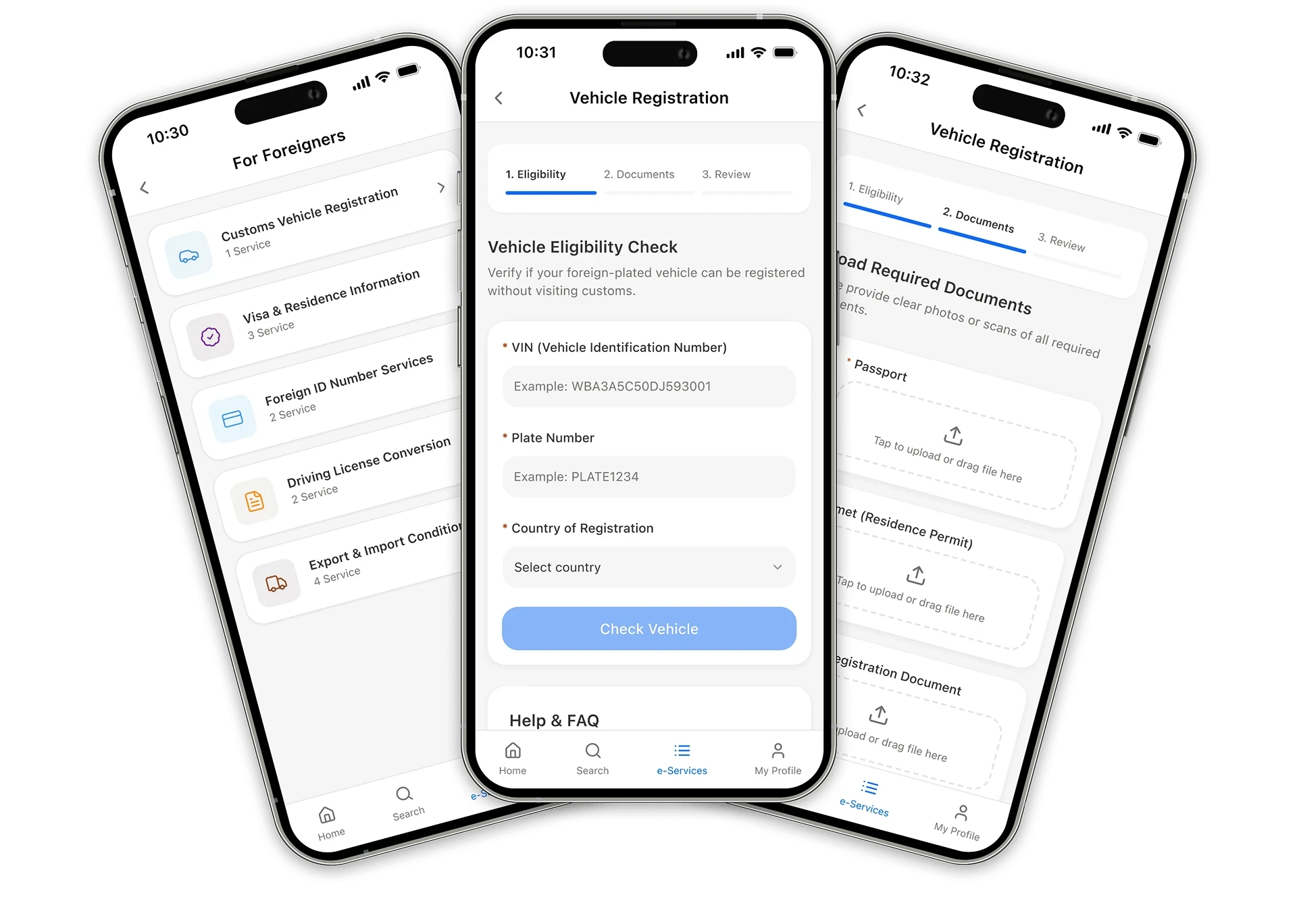
Three screens of vehicle registration feature inside e-Devlet app

This MVP reimagines vehicle registration on Turkey’s e-Gov platform, turning an offline customs process into a simple mobile flow.

My roles

My roles

My roles

Research

Research

Research

UX design

UX design

UX design

UI direction

UI direction

UI direction

Prototyping

Prototyping

Prototyping

Testing

Testing

Testing

Tools

Tools

Tools

Figma

Lovable

Maze

Platform

Platform

Platform

iOS app

Context

Foreign residents in Turkey who hold a valid residence permit (ikamet) may use foreign-plated vehicles for up to 24 months, but the registration process is still entirely offline.

It requires visiting customs offices, waiting in queues and completing a manual VIN inspection. These steps creates friction for users and additional workload for authorities.

This MVP explores how the key steps of this process could be digitized inside the e-Devlet mobile app.

Car inspections at Customs parking

Research

To understand how the current process works and where digital improvements could help the most, I examined the full offline workflow, mapped the user journey and reviewed the rules for ikamet holders. I also looked at existing e-Devlet services to understand the UI patterns the MVP should follow.
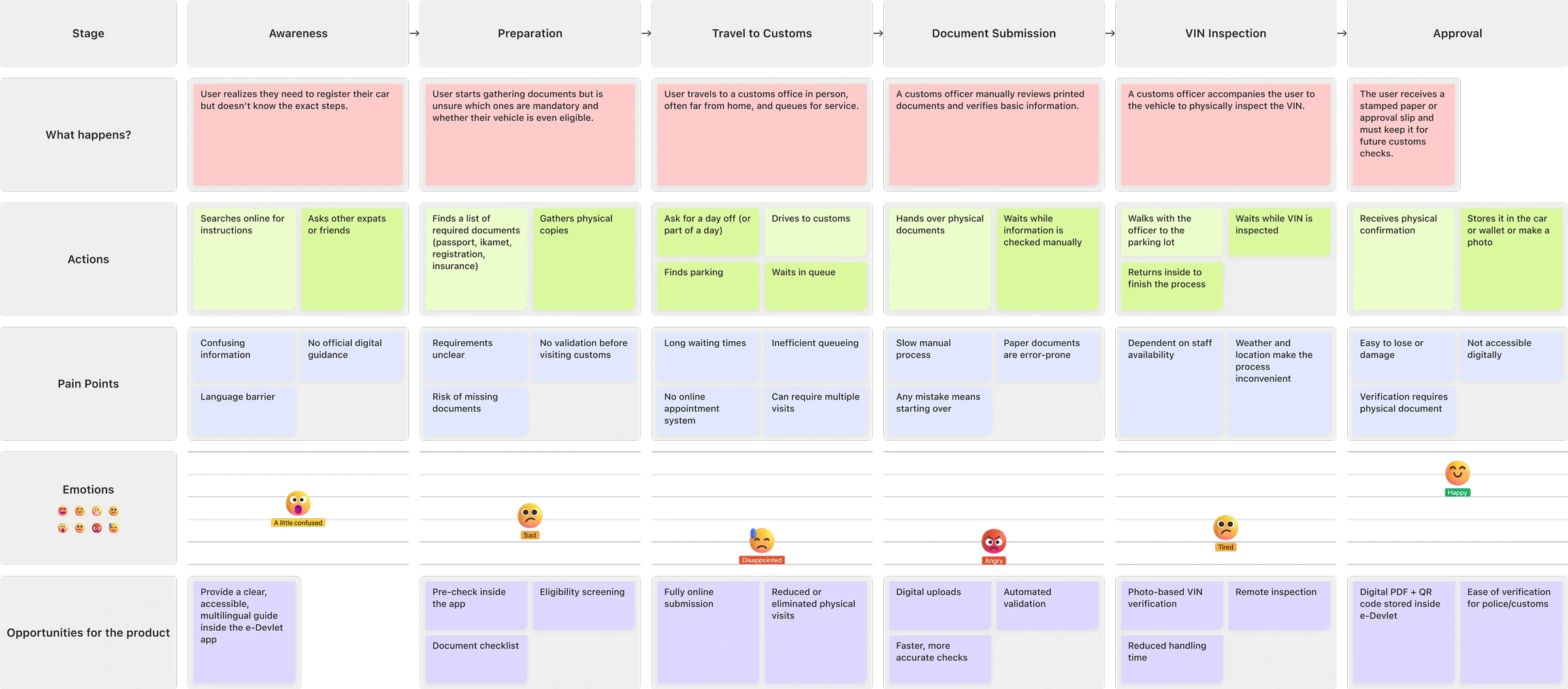
e-Devlet current app Customer Journey Map

CJM for visualising the end-to-end user experience to highlight pain points.

CJM for visualising the end-to-end user experience to highlight pain points.

Problems

This research revealed several issues that consistently affect both users and authorities:

01.

Unclear requirements

No centralized digital source explains what documents are needed.

01.

Unclear requirements

No centralized digital source explains what documents are needed.

03.

Manual document handling

Paper verification is slow, error-prone and inconsistent, causing occasional delays.

03.

Manual document handling

Paper-based verification is slow, error-prone and inconsistent, causing occasional delays.

05.

Manual VIN inspection

Physical verification creates one of the biggest bottlenecks, and frequent delays.

05.

Manual VIN inspection

Physical verification creates one of the biggest bottlenecks and frequent delays.

02.

No pre-check

Users cannot validate eligibility or confirm documents before visiting customs.

02.

No pre-check

Users cannot validate eligibility or confirm documents before visiting customs.

04.

In-person visits

Long queues, limited staff availability and repeated trips create unnecessary friction.

04.

In-person visits

Long queues, limited staff availability and repeated trips create unnecessary friction.

06.

No digital confirmation

Registration is issued only on paper and cannot be accessed through the app.

06.

No digital confirmation

Registration is issued only on paper and cannot be accessed through the app.

01.

Unclear requirements

No centralized digital source explains what documents are needed.

02.

No pre-check

Users cannot validate eligibility or confirm documents before visiting customs.

03.

Manual document handling

Paper verification is slow, error-prone and inconsistent, causing occasional delays.

04.

In-person visits

Long queues, limited staff availability and repeated trips create unnecessary friction.

05.

Manual VIN inspection

Physical verification creates one of the biggest bottlenecks, and frequent delays.

06.

No digital confirmation

Registration is issued only on paper and cannot be accessed through the app.

How might we simplify the vehicle registration process in Turkey for people with foreign-plated cars?

Solutions

Based on the problems identified in the current offline process, several improvements can be introduced to make the registration experience clearer, faster and more user-friendly.

01.

Provide clear requirements

Offer a structured explanation of required documents and steps so users know exactly what to prepare before starting.

01.

Provide clear requirements

Offer a structured explanation of required documents and steps so users know exactly what to prepare before starting.

03.

Digital document submission

Replace paper handling with secure document uploads to reduce errors and manual processing.

03.

Digital document submission

Paper-based verification is slow, error-prone and inconsistent, causing occasional delays.

05.

Remote VIN verification

Allow users to upload a VIN photo so that customs officers can complete this step without meeting in person.

05.

Remote VIN verification

Physical verification creates one of the biggest bottlenecks and frequent delays.

02.

Eligibility pre-check

Allow users to verify VIN, plate number and country of registration in advance to avoid unnecessary visits to customs.

02.

Eligibility pre-check

Allow users to verify VIN, plate number and country of registration in advance to avoid unnecessary visits to customs.

04.

Reduce office visits

Move as many steps as possible online — especially document checks and basic verification.

04.

Reduce office visits

Move as many steps as possible online — especially document checks and basic verification.

06.

Provide digital confirmation

Offer a downloadable PDF and QR code as a reliable, always-accessible proof of registration.

06.

Provide digital confirmation

Offer a downloadable PDF and QR code as a reliable, always-accessible proof of registration.

01.

Provide clear requirements

Offer a structured explanation of required documents and steps so users know exactly what to prepare before starting.

02.

Eligibility pre-check

Allow users to verify VIN, plate number and country of registration in advance to avoid unnecessary visits to customs.

03.

Digital document submission

Replace paper handling with secure document uploads to reduce errors and manual processing.

04.

Reduce office visits

Move as many steps as possible online — especially document checks and basic verification.

05.

Remote VIN verification

Allow users to upload a VIN photo so that customs officers can complete this step without meeting in person.

06.

Provide digital confirmation

Offer a downloadable PDF and QR code as a reliable, always-accessible proof of registration.

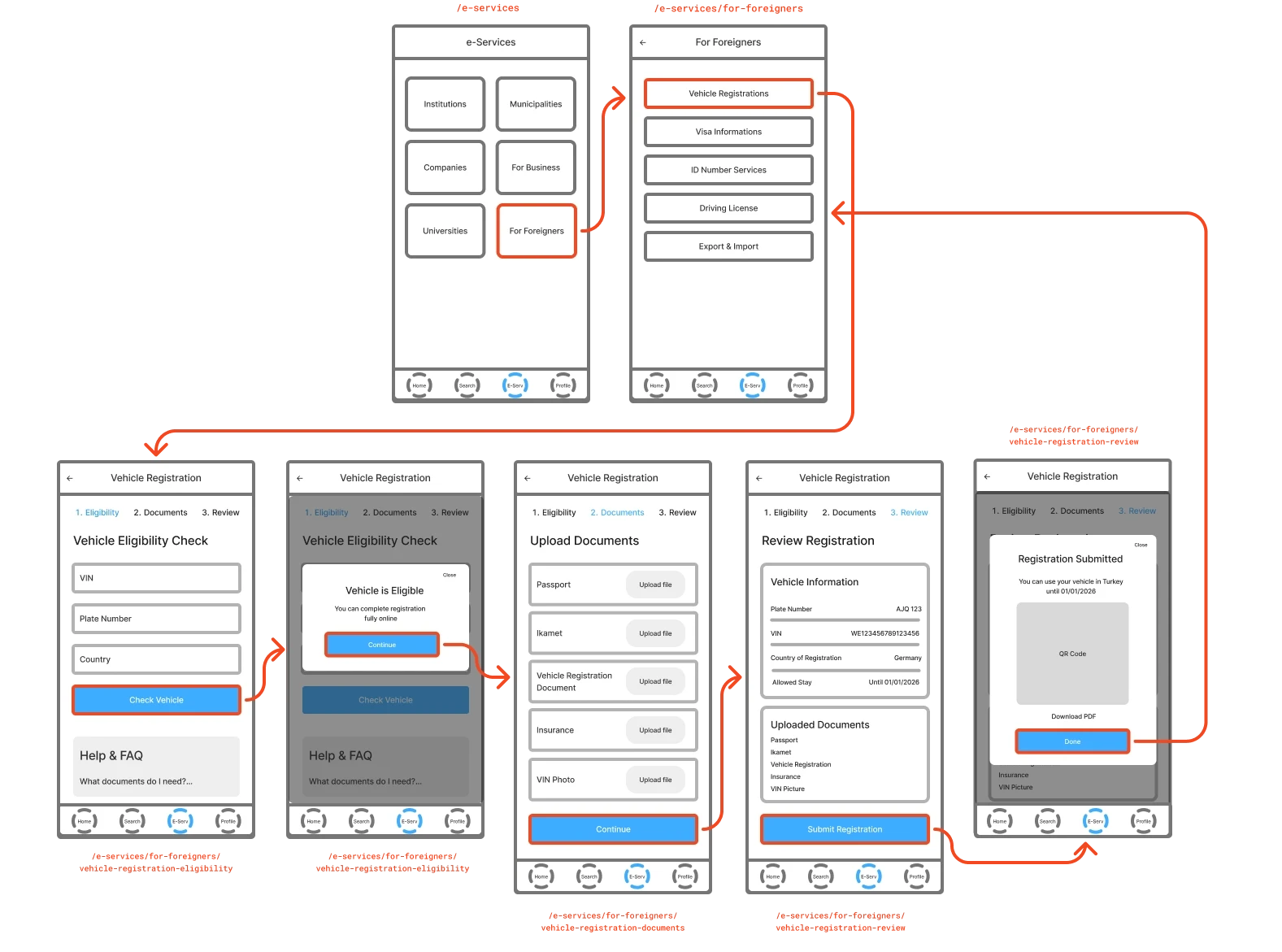
MVP Wireframes

This MVP follows the existing e-Devlet navigation model, where services are accessed through a hierarchical structure.

To stay consistent with the real app, the prototype includes five screens - two navigational screens and three core registration steps.
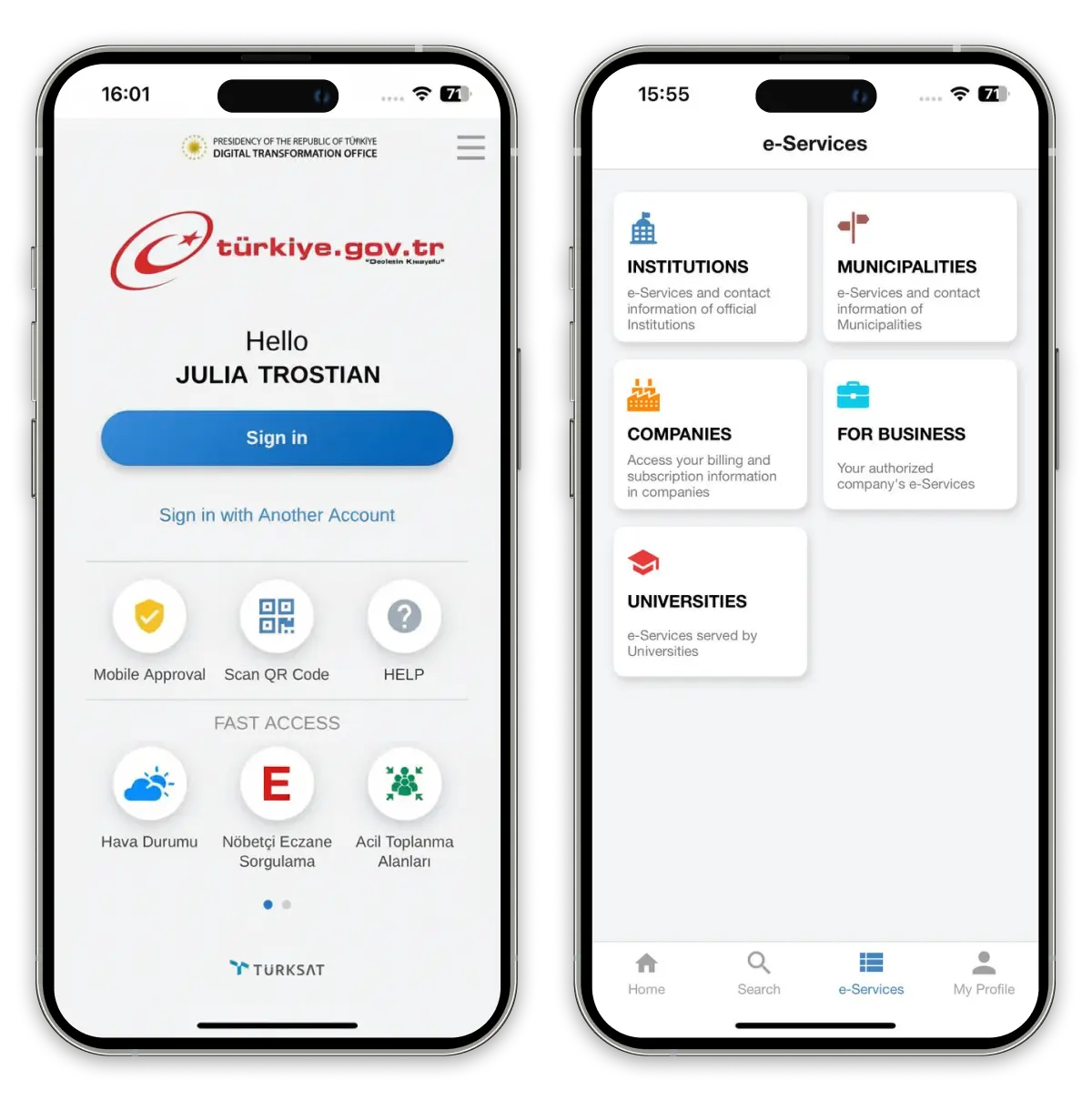
two screens of e-Devlet app current UI

Current e-Devlet app UI

Vehicle registration feature flow

MVP wireframes and flow

Prototype

Using Lovable, I created a functional prototype that demonstrates how the foreign-vehicle registration flow could operate inside the e-Devlet app.

The prototype mirrors existing government UI patterns and includes the full journey: from service discovery to eligibility validation, document upload and digital confirmation. It allows the concept to be tested quickly and realistically.

Using Lovable, I created a functional prototype that demonstrates how the foreign-vehicle registration flow could operate inside the e-Devlet app.


The prototype mirrors existing government UI patterns and includes the full journey: from service discovery to eligibility validation, document upload and digital confirmation. It allows the concept to be tested quickly and realistically.

Using Lovable, I created a functional prototype that demonstrates how the foreign-vehicle registration flow could operate inside the e-Devlet app.


The prototype mirrors existing government UI patterns and includes the full journey: from service discovery to eligibility validation, document upload and digital confirmation. It allows the concept to be tested quickly and realistically.

This is a clickable prototype on the right. You can try registering a vehicle here.

Below is a clickable prototype. You can try registering a vehicle here.

or

Try the Prototype on Web

9:41
9:41
9:41

Try the Prototype on Web

or

Contact

Usability Testing

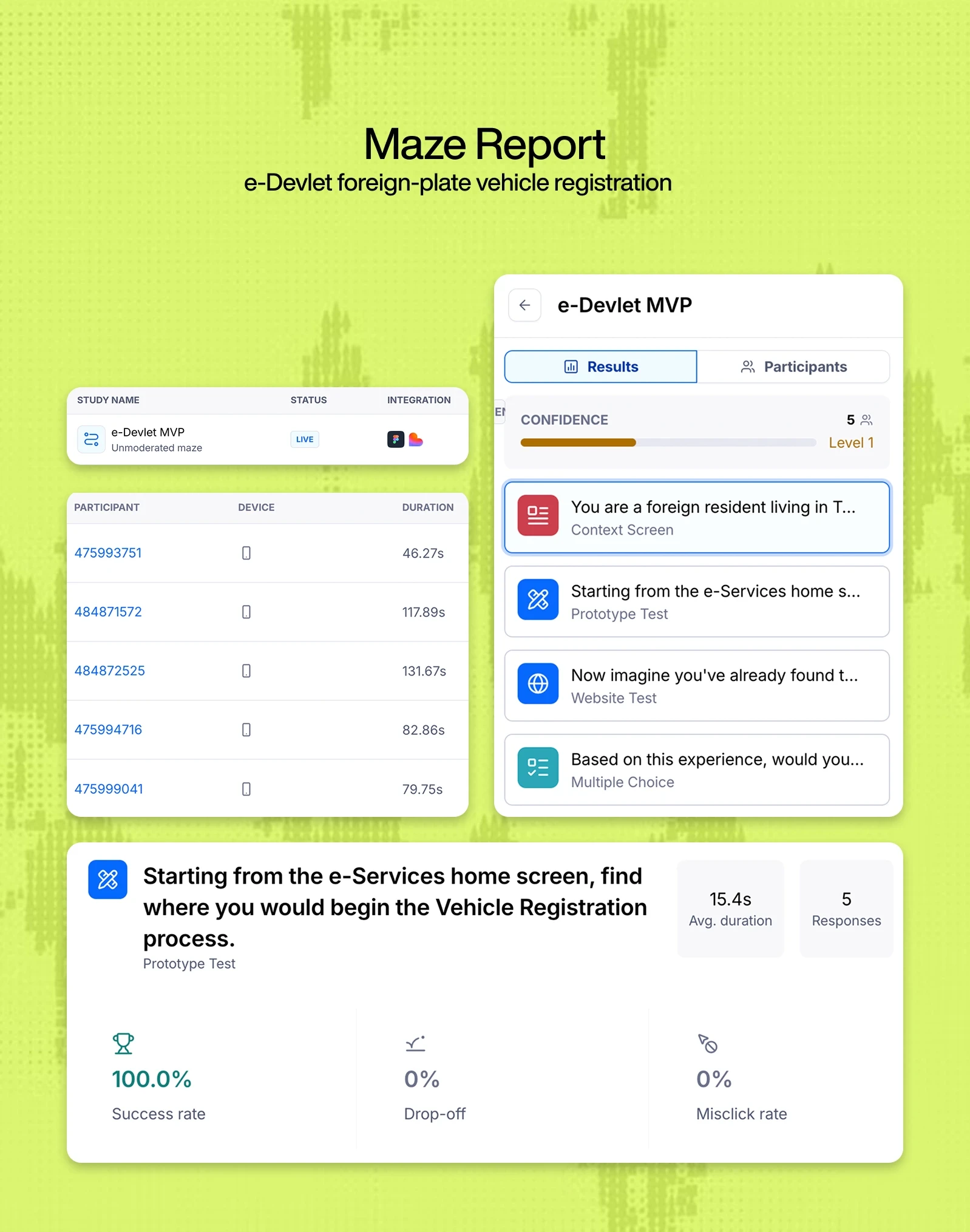
To validate the proposed solution, I conducted usability testing using Maze, combining both a high-fidelity Figma prototype and a live web prototype.

The test was conducted with a small sample size (5 participants), focusing on early validation of navigation, clarity and user confidence.
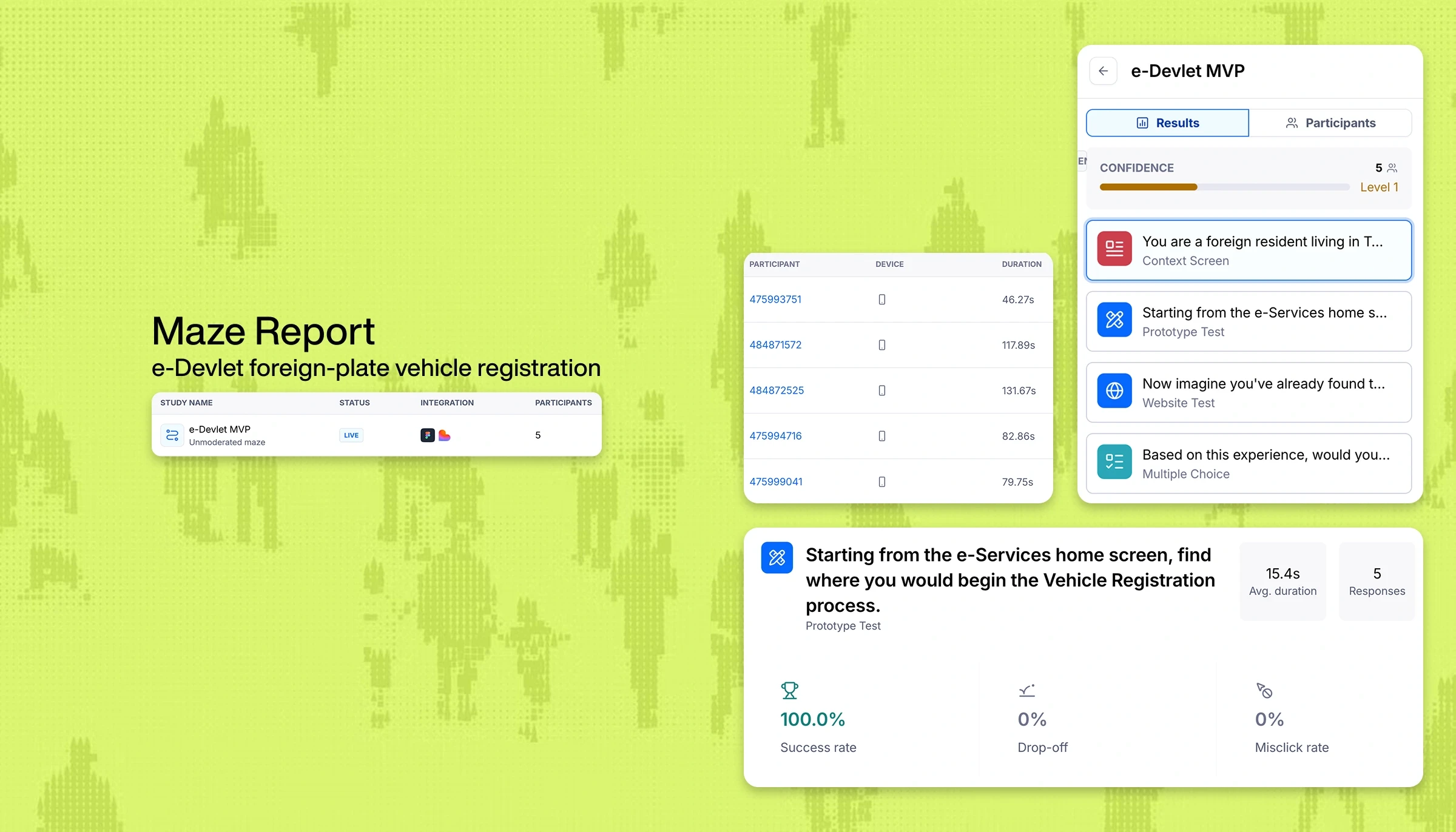
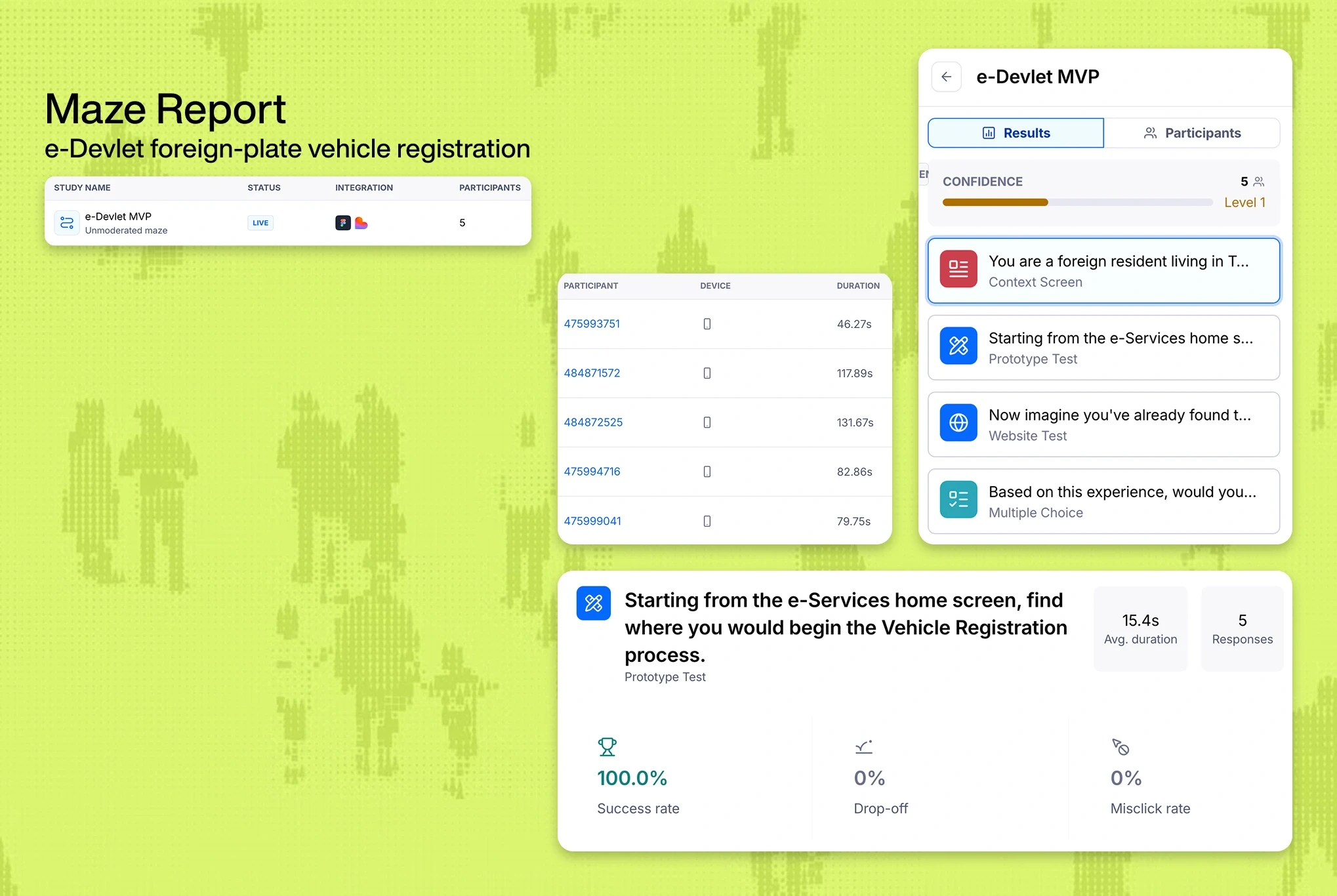
The test included two parts. First, I checked whether users could find where the vehicle registration process starts from the e-Services home screen. Then, I asked participants to complete the full registration flow in a live test environment, using fictional data where needed.
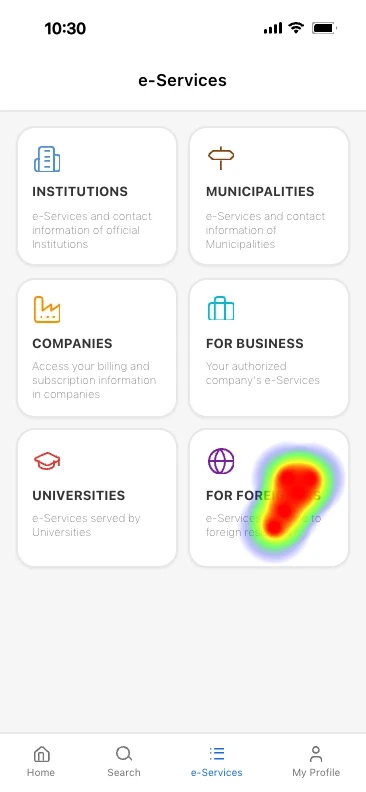
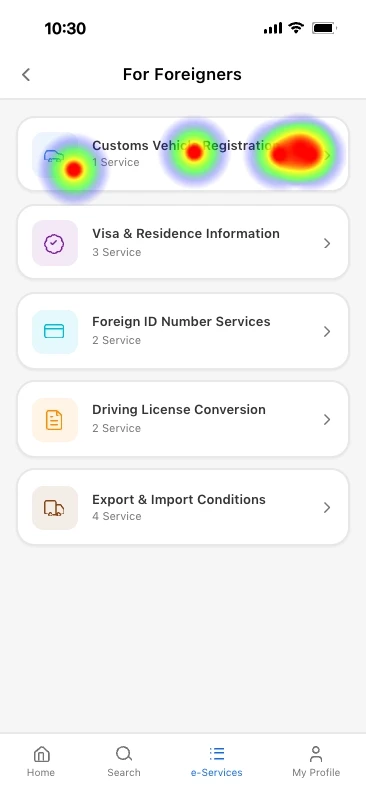
Heat map of first screen of Vehicle Registration feature
Heat map of second screen of Vehicle Registration feature

User interaction heatmaps for the first two screens

Key Insights

These findings are based on a small sample size and should be validated with a larger group to gain a deeper understanding of user behaviour.

  1. Users easily found where to start the vehicle registration process from the e-Services home screen.

  2. The “For Foreigners” category matched user expectations and required no additional guidance.

  3. All participants completed the full registration flow and reported high confidence in completing the process in real life.

These findings are based on a small sample size and should be validated with a larger group to gain a deeper understanding of user behaviour.

  1. Users easily found where to start the vehicle registration process from the e-Services home screen.

  2. The “For Foreigners” category matched user expectations and required no additional guidance.

  3. All participants completed the full registration flow and reported high confidence in completing the process in real life.